
Showing posts with label Mathematics. Show all posts
Showing posts with label Mathematics. Show all posts
Gambling Game Code Implementation in Matlab and C - Simulation
Problem:
Write the gambling game code in Matlab.Logic / Algorithm for Gambling game code:
Initialize head = 0, tail = 0, difference = 0
while (1)
toss the coin and make value from 0 to 10 using reminder
  if (toss > 4)
     tail = tail + 1
  else
     head = head + 1
  take difference = head - tail
  if (difference == 3)
    result = 8 - upto_time
    if (result < 0)
       lose
    else
       won
  else
Gambling game Code in Matlab
clc;
n = input('How many time you want to play the game : ');

difference = 0;
tail = 0;
head = 0;

fprintf('\n---------------------------------------------------------------\n');
fprintf('Game No.\tSl No.\tRandom Number\tHeads\tTails\tDifference');
fprintf('\n---------------------------------------------------------------\n');

for i = 1:n
    j = 1;

    while 1
        toss = int8((10-0)*rand(1) + 0); %Generate a random number between 0 to 10%

        if (toss > 4)
            tail = tail + 1;
        else
            head = head + 1;
        end

        difference = abs((head - tail));
        fprintf('\n\t%d\t\t%d\t\t\t%d\t\t\t%d\t\t%d\t\t%d\t\t%d', i, j, toss, head, tail, difference);

        if(difference == 3) %The rules of the Gambling - If difference = 3 then Count the lose or won coins
            result = 8 - j;
            if(result < 0)
                fprintf('\n\t\tYou lose %d coins\n', abs(result));
            else
                fprintf('\n\t\tYou won %d coins\n', abs(result));
            end
            break;
        end
        j = j + 1;
    end % End while
end  % End For
Output Gambling game Code in Matlab

Gambling game Code in C Language
#include<stdio.h>
#include<stdlib.h>

int main()
{
    int tail,head,i,n,j,difference=0,result,toss;
    printf("How many time you want to play ? ");
    scanf("%d",&n);
    printf("\n");

    tail = 0;
    head = 0;

    printf("Serial \t Head: \t Tail: \t Difference: \t\n");

    for(i=1; i<=n; i++)
    {
        j = 1;


        while(1)
        {
            // taking random number
            toss = rand() % 10;
            if(toss > 4)
            {
                // if(5,6,7,8,9) then tail will increase
                tail = tail + 1;
            }
            else
            {
                // if(,1,2,3,4) then head will increase
                head = head + 1;
            }
            // difference between head and tail
            difference = abs((head - tail));
            printf("%d\t%d\t%d\t%d\n",j,head,tail,difference);
            if(difference == 3)
            {
                // counting result suppose the difference match after 10 step then difference = 8-10=2
                result = 8 - j;
                if(result < 0)
                {
                    // if answer negative then you are in lose this is the amount of losed coin
                    printf("You lose %d Coin\n",abs(result));
                }
                else
                {
                    // if answer positive then you are in benefit this is the amount of benefited/win coin
                    printf("You win %d Coin\n",abs(result));
                }
                break;
            }
            // increament the count like serial number
            j++;
        }
    }
    return 0;
}
Gambling game Code in C Language Output

Tags:
Gambling Game Code Implementation in Matlab and C - Simulation, Gambling Matlab code, Gambling game C code, gambling game code implementation, gambling gamePure Pursuit Problem Code - Matlab and C code of Pure pursuit problem
What is Pure pursuit:
Pure pursuit is a type of pursuit curve used in aerial combat in which an aircraft pursues another aircraft by pointing its nose directly towards it.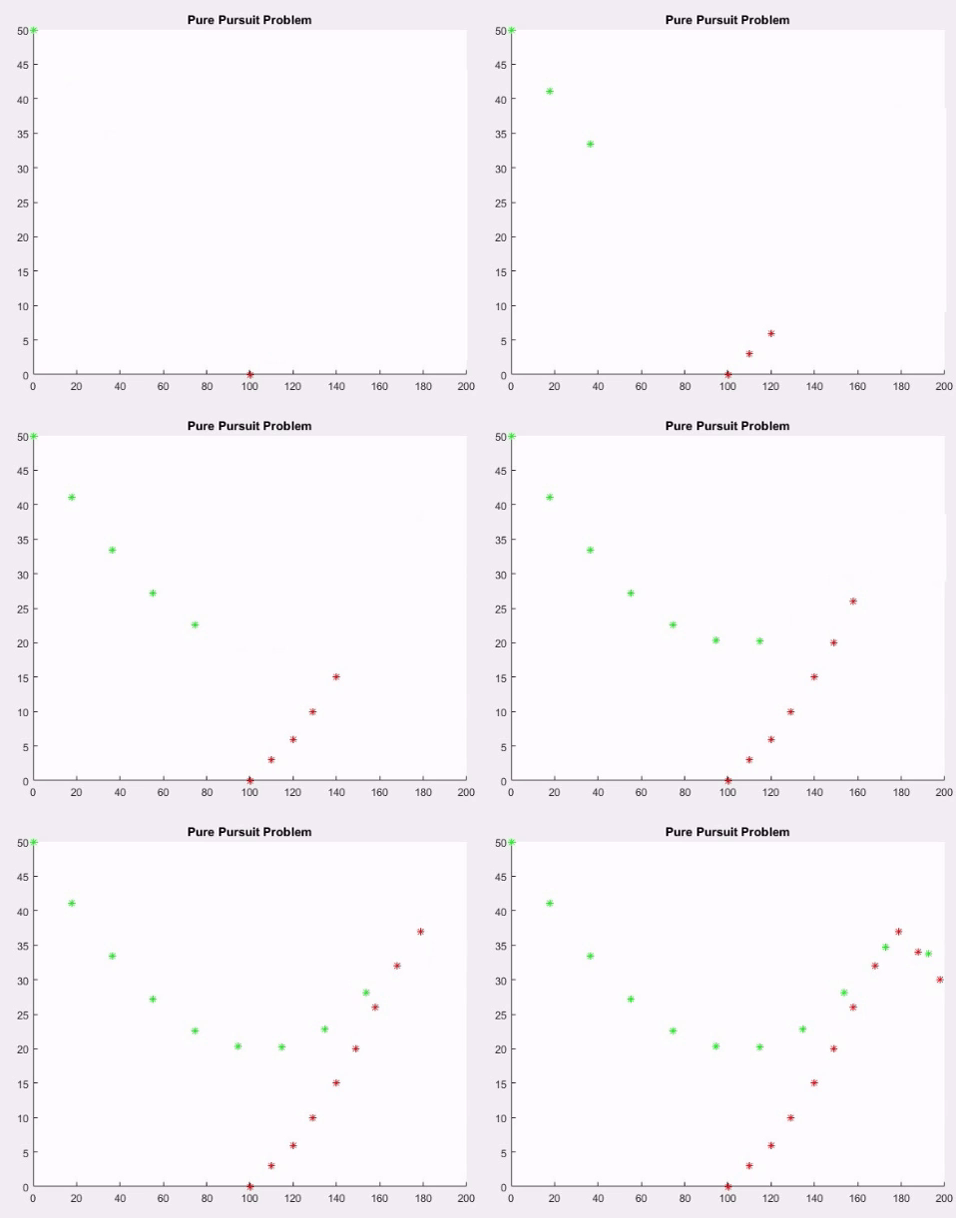
What is mainly Pure pursuit is:
Logic Behind the pure pursuit problem of simulation:- Bomber Aircraft and a Fighter Aircraft are flying in the a horizontal plane.
- Fighter aircraft and bomber aircraft both are moving inside the rectangular range.
- The fighters and bombers have a velocity given, suppose s = 20 in our code.
- When the distance of the Bomber and the Fighter is less than 12 units, it is assumed that the Bomber is shot down or destroyed.
- The distance between this the bombers and fighter follows the distance rule - dist[t] = √( (yb[t]-yf[t])² + (xb[t]-yf[t])² ).
- In matlab the distance will be dist = sqrt(y^2+x^2).
- Look the pure pursuit problem code now and hope it'll clear to you.

Pure Pursuit Problem MatLab Code
clc;
hold all;
xb=[100 110 120 129 140 149 158 168 179 188 198 209 219 226 234 240];
yb=[0 3 6 10 15 20 26 32 37 34 30 27 23 19 16 14];

xf = [];
yf = [];
xf(1)=0;
yf(1)=50;
s=20;
dist=0;

for i=1:15
   pause on;
    plot(xb(i),yb(i),'r*');
    title('Pure Pursuit Problem');
    pause(1);
    plot(xf(i),yf(i),'g*');
    y=yb(i)-yf(i);
    x=xb(i)-xf(i);

  dist=sqrt(y^2+x^2);

  if(dist<=12)
        fprintf('Bomber destroyed at  %d s',i);
        break;
  end

  xf(i+1)=xf(i)+s*((xb(i)-xf(i))/dist);
  yf(i+1)=yf(i)+s*((yb(i)-yf(i))/dist);
end
Pure Pursuit Problem Output - Matlab:
>> Bomber destroyed at 11 s
>>
Pure Pursuit problem in C language:
Code:
#include < stdio.h >
#include < math.h >
#include < stdlib.h >

void main()
  {
   float xf,yf, xb,yb,d,distance;
   int flag=0,
   vf=20,
   time=0;
   randomize();
   xf=rand()%1001;
   yf=rand()%1001;
   xb=rand()%1001;
   yb=rand()%1001;
   while(flag==0)
    {
 d= (yb-yf)*(yb-yf)+(xb-xf)*(xb-xf);
 distance=sqrt(d);
 printf("time=%d   xf=%5.2f  yf=%5.2f  xb=%5.2f  yb=%5.2f  distance=%5.2f\n\n",time,xf,yf,xb,yb,distance);
 if(distance >100)
   {
    printf("The bomber plain was shot down at %d second\n",time);
    flag=1;
   }
 else if(distance>900)
   {
     printf("The bomber plane escaped from sight at %d second\n", time);
     flag=1;
   }
 else
   {
     xf=xf+vf*(xb-xf)/distance;
     yf=yf+vf*(yb-yf)/distance;
     xb=rand()%1001;
     yb=rand()%1001;
     time=time+1;
   }
    }
    getch();
}
Output C code Pure Pursuit:
CASE 1:  BOMBER  IS SHOT DOWN BY FIGHTER

time=0   xf=688.00  yf=796.00  xb=366.00  yb=119.00  distance=749.68

time=1   xf=679.41  yf=777.94  xb=563.00  yb=771.00  distance=116.62

time=2   xf=659.45  yf=776.75  xb=419.00  yb=939.00  distance=290.07

time=3   xf=642.87  yf=787.94  xb=87.00  yb=931.00  distance=573.98

time=4   xf=623.50  yf=792.92  xb=960.00  yb=247.00  distance=641.30

time=5   xf=633.99  yf=775.90  xb=197.00  yb=203.00  distance=720.54

time=6   xf=621.86  yf=759.99  xb=799.00  yb=891.00  distance=220.32

time=7   xf=637.94  yf=771.89  xb=207.00  yb=310.00  distance=631.70

time=8   xf=624.30  yf=757.26  xb=193.00  yb=915.00  distance=459.24

time=9   xf=605.52  yf=764.13  xb=311.00  yb=991.00  distance=371.76

time=10   xf=589.67  yf=776.34  xb=816.00  yb=304.00  distance=523.76

time=11   xf=598.31  yf=758.30  xb=804.00  yb=587.00  distance=267.68

time=12   xf=613.68  yf=745.50  xb=122.00  yb=530.00  distance=536.84

time=13   xf=595.36  yf=737.47  xb=924.00  yb=705.00  distance=330.24

time=14   xf=615.27  yf=735.51  xb=100.00  yb=508.00  distance=563.26

time=15   xf=596.97  yf=727.43  xb=48.00  yb=39.00  distance=880.51

time=16   xf=584.50  yf=711.79  xb=990.00  yb=710.00  distance=405.50

time=17   xf=604.50  yf=711.70  xb=523.00  yb=629.00  distance=116.11

time=18   xf=590.46  yf=697.46  xb=894.00  yb=148.00  distance=627.72

time=19   xf=600.13  yf=679.95  xb=463.00  yb=537.00  distance=198.09

time=20   xf=586.29  yf=665.52  xb=308.00  yb=709.00  distance=281.67

time=21   xf=566.53  yf=668.61  xb=488.00  yb=605.00  distance=101.06

time=22   xf=550.99  yf=656.02  xb=107.00  yb=522.00  distance=463.77

time=23   xf=531.84  yf=650.24  xb=305.00  yb=777.00  distance=259.86

time=24   xf=514.38  yf=659.99  xb=250.00  yb=794.00  distance=296.40

time=25   xf=496.54  yf=669.04  xb=448.00  yb=950.00  distance=285.13

time=26   xf=493.14  yf=688.74  xb=252.00  yb=285.00  distance=470.27

time=27   xf=482.88  yf=671.57  xb=623.00  yb=646.00  distance=142.43

time=28   xf=502.56  yf=667.98  xb=640.00  yb=327.00  distance=367.64

time=29   xf=510.03  yf=649.43  xb=357.00  yb=811.00  distance=222.54

time=30   xf=496.28  yf=663.95  xb=623.00  yb=353.00  distance=335.78

time=31   xf=503.83  yf=645.43  xb=156.00  yb=371.00  distance=443.06

time=32   xf=488.13  yf=633.04  xb=533.00  yb=117.00  distance=517.99

time=33   xf=489.86  yf=613.12  xb=301.00  yb=627.00  distance=189.37

time=34   xf=469.91  yf=614.59  xb=143.00  yb=263.00  distance=480.09

time=35   xf=456.29  yf=599.94  xb=780.00  yb=654.00  distance=328.19

time=36   xf=476.02  yf=603.23  xb=928.00  yb=422.00  distance=486.96

time=37   xf=494.58  yf=595.79  xb=757.00  yb=44.00  distance=611.01

time=38   xf=503.17  yf=577.73  xb=734.00  yb=192.00  distance=449.52

time=39   xf=513.44  yf=560.57  xb=49.00  yb=949.00  distance=605.47

time=40   xf=498.10  yf=573.40  xb=515.00  yb=893.00  distance=320.05

time=41   xf=499.16  yf=593.37  xb=111.00  yb=765.00  distance=424.41

time=42   xf=480.87  yf=601.46  xb=463.00  yb=633.00  distance=36.25

The bomber plain was shot down at 42 second

CASE 2: BOMBER  ESCAPES FROM  THE SIGHT OF FIGHTER

time=0   xf=642.00  yf=902.00  xb=788.00  yb=709.00  distance=242.00

time=1   xf=654.07  yf=886.05  xb=585.00  yb=997.00  distance=130.69

time=2   xf=643.50  yf=903.03  xb=587.00  yb= 6.00  distance=898.81

time=3   xf=642.24  yf=883.07  xb=11.00  yb=162.00  distance=958.33

The bomber plane escaped from sight at 3 second
Links Where you can learn more on Pure pursuit problem:
- Wikipedia - Pure Pursuit
- Mathworks - Pure Pursuit
Tags:
Pure Pursuit Problem Code - Matlab and C code of Pure pursuit problem, Pure pursuit problem, Pure pursuit problem code, pure pursuit solution in c language, pure pursuit simulation, pure pursuit logic, pure pursuit algorithm, pure pursuit learning, pure pursuit explanation,Single Server Queuing System - MatLab and C code Implementation
What:
A single server queuing system is the waiting lines or queues in that system. A single server queuing system can tell us the following things-- How many times a user need to wait in waiting & Total waiting time
- How many times user take in service time & Total service time
- How many users are in the Queue & Total queue time
- How many users has completed their work in that system yet.

Where Single server queuing system is used
Single server queuing system is applied almost all the fields in real life. Like,- In banking system, taking money from the bank. User needs to stand in a line and take money one by one
- A Bus, plane ticketing system
- Any system with line and who needs to put user in the queue
Real time example of a server queuing system - Patient Data:
 |
| Single Server Queuing Example of patient and doctor |
Single Server Queuing MatLab Code implementation without input (with figure):
Code
total=0; busy=0;
%a=randi([0 8],1,8);
 a=[.4 1.6 2.1 3.8 4.0 5.6 5.8 7.2];
a_length=length(a);
arr=zeros(a_length);

%d=randi([0 9],1,5);
d=[2.4 3.1 3.3 4.9 8.6];
b=union(a,d);
l=length(b);
a_t=0;d_t=0;q=0;
axis([0 b(length(b))+1 0 length(a)]);


%Queue delay Time
figure(1);
title('Queue Delay Time');
for i=1:l-1
   a_m=ismember(a,b(i));
   d_m=ismember(d,b(i));
   if sum(a_m)>=1
       a_t=a_t+1;
   end
   if sum(d_m)>=1
       d_t=d_t+1;
   end
   dif=a_t-d_t;
   if dif>1
       rectangle('Position',[b(i) 0 b(i+1)-b(i) dif-1],'FaceColor',[0 .5 .5]);
       arr(dif)=arr(dif)+(b(i+1)-b(i));
   end
   if dif>0
       busy=busy+(b(i+1)-b(i));
   end
end


%Server Busy Time
b_t=0;
figure(2);
title('Server Busy Time');
axis([0 b(length(b))+1 0 length(a)]);
for i=1:l-1
   a_m=ismember(a,b(i));
   d_m=ismember(d,b(i));
   if sum(a_m)>=1
       b_t=b_t+1;
   end
   if sum(d_m)>=1
       b_t=b_t-1;
   end
   if b_t>0
       rectangle('Position',[b(i) 0 b(i+1)-b(i) 1],'FaceColor',[0 .5 .5]);
   end
end
for i=1:a_length
    total=total+arr(i)*(i-1);
end
disp(total);
disp(total/d(length(d)));
disp(busy);
disp(busy/d(length(d)));
Output with Figure
(Run the code and wait. Figure will open after 2/3 seconds)
 |
| Matlab Complaete Example - Single Server Queuing system |
Single Server Queuing MatLab Code implementation with input:
N = input('Enter the Value of N: ');

% Variable Declaration
AT = [];
ST = [];
WT = [];
QL = [];
IDT = [];
CAT = [];
CDT = [];
CLK = 0;

% Initialization
AT(1) = 0;
for k = 2:N
AT(k) = input('Enter interarrival time : ');
end
for k = 1:N
ST(k) = input('Enter Service time : ');
end
CAT(1) = AT(1);
CDT(1) = ST(1);
for k = 1:N
WT(k) = 0;
IDT(k) = AT(1);
QL(k) = 0;
end

% Calculation
for i = 2:N
CAT(i) = CAT(i-1) + AT(i);
WT(i) = CDT(i-1) - CAT(i);
if WT(i) < 0
WT(i) = 0;
end

DIF = CAT(i) - CDT(i-1);
if DIF < 0
CDT(i) = CDT(i-1) + ST(i) ;
if i>2
if (CAT(i) < CDT(i-2) || QL(i-1) == 0)
QL(i) = QL(i-1) + 1;
else
QL(i) = QL(i-1);
end
else
QL(i) = QL(i-1) + 1;
end
elseif DIF > 0
CDT(i) = CAT(i) + ST(i) ;
if QL(i-1) > 0
QL(i) = QL(i-1) - 1;
end
else
QL(i) = QL(i-1);
end
if QL(i) == 0
IDT(i) = CAT(i) - CDT(i-1);
end
end

% Display Results
CAT
CDT
WT
IDT

QL
Input data / Output Example for this single server queuing system
Enter the Value of N: 8
Enter interarrival time : 10
Enter interarrival time : 15
Enter interarrival time : 35
Enter interarrival time : 30
Enter interarrival time : 10
Enter interarrival time : 5
Enter interarrival time : 5
Enter Service time : 20
Enter Service time : 15
Enter Service time : 10
Enter Service time : 5
Enter Service time : 15
Enter Service time : 15
Enter Service time : 10
Enter Service time : 10

CAT =
     0    10    25    60    90   100   105   110

CDT =
    20    35    45    65   105   120   130   140

WT =
     0    10    10     0     0     5    15    20

IDT =
     0     0     0    15    25     0     0     0

QL =

     0     1     1     0     0     1     1     2

>>
Single Server Queuing C Code implementation:
Single Server Queuing system in Java language:
import java.util.Random;

/**
*
* @author Hizbul Bahar
*/
public class SingleServer {
static int Queue_size = 32000;
static int next_event_type;
static int num_custs_delayed;
static int num_events=2;
static int num_in_q;
static int server_status;
static int num_delays_required;
static double area_num_in_q;
static double area_server_status;
static double sim_time;
static double time_last_event;
static double total_of_delays;
static double mean_interarrival;
static double mean_service;

static double[] time_arrival = new double[Queue_size];
static double[] time_next_event=new double[3];

static Random random = new Random(10000);

static void initialize()
{
sim_time = 0;

server_status = 0;
num_in_q = 0;
time_last_event = 0;

num_custs_delayed = 0;
total_of_delays = 0;
area_num_in_q = 0;
area_server_status = 0;

time_next_event[1] = sim_time + expon(mean_interarrival);
time_next_event[2] = 1.0e+30;
}

static void timing()
{

if (time_next_event[1] < time_next_event[2])
next_event_type = 1;
else
next_event_type = 2;

sim_time = time_next_event[next_event_type];
}

static void arrive()
{
double delay;

time_next_event[1] = sim_time + expon(mean_interarrival);

if (server_status == 1)
{
num_in_q++;
time_arrival[num_in_q] = sim_time;
}

else
{
delay = 0;
total_of_delays += delay;

num_custs_delayed++;
server_status = 1;

time_next_event[2] = sim_time + expon(mean_service);
}
}

static void depart()
{
if (num_in_q == 0)
{
server_status = 0;
time_next_event[2] = 1.0e+30;
}
else
{
num_in_q--;

num_custs_delayed++;
time_next_event[2] = sim_time + expon(mean_service);

for (int i = 1; i <= num_in_q; i++)
time_arrival[i] = time_arrival[i+1];
}
}

static void report()
{
System.out.println( "TOtal customer uses this server " + num_custs_delayed + "\n");
System.out.println( "Average delay in queue minutes  " + total_of_delays / num_custs_delayed + "\n");
System.out.println( "Average number in queue  " + area_num_in_q / sim_time + "\n");
System.out.println( "Server utilization  " + area_server_status / sim_time + "\n");
}

static void update_time_avg_stats()
{
double time_since_last_event;

time_since_last_event = sim_time - time_last_event;
time_last_event = sim_time;

area_num_in_q += num_in_q * time_since_last_event;

area_server_status += server_status * time_since_last_event;
}

static double expon(double  mean)
{
return -mean * Math.log(random.nextDouble());
}

public static void main(String[] args) {

timing();
update_time_avg_stats();

switch (next_event_type)
{
case 1: arrive();
break;
case 2: depart();
}
}
}
Links following to learn single server queuing system
- Wikipedia - Queuing Theory
- A single Server Queuing system.pdf
Tags:
Single Server queuing system example, Single Server Queuing System - MatLab, C, Java code Implementation, Single Server Queuing System Matlab code, Single Server Queuing System C code, Single Server Queuing System java code, Single Server Queuing System matlab code implementation, single server queue, discrete simulation example, single server code and algorithmLaplace Transform Derivatives Theorem Proofs - First, Second, Third Order Proofs
Laplace Transform Derivatives First Order Proof:
We'll now find the first order derivatives theorem proof of Laplace transform here:
First Order Derivative theorem is =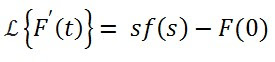
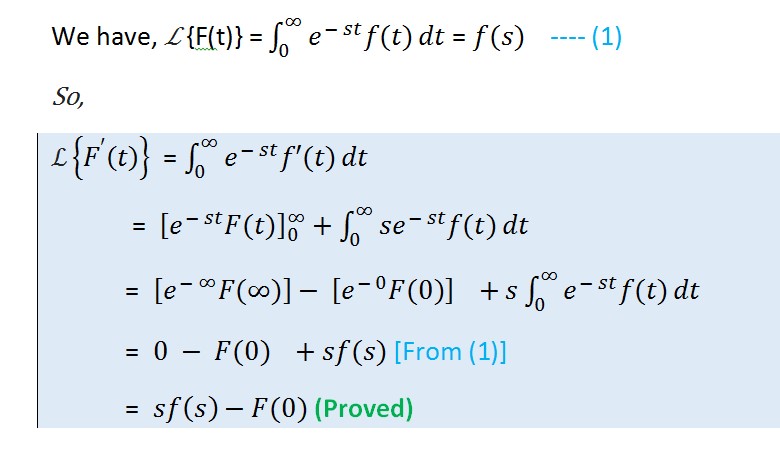
First Order Derivative theorem is =

Proof Of First Order Derivative theorem Laplace Transform:
So, by this way we've proved the first order derivatives theorem for Laplace Transform.
Laplace Transform Derivatives Second Order Proof:
We'll now find the second order derivatives theorem proof of Laplace transform here:
If F(t) is a twice differential function of t then

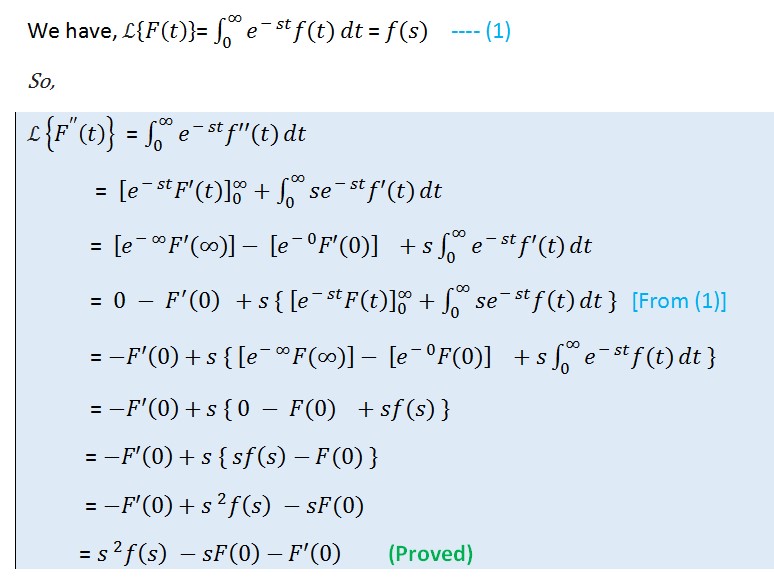
I've written here the complete works , we can also define that we can get one equation from previous Laplace transform theorem. So, we've proved Laplace transform second order derivatives theorem.


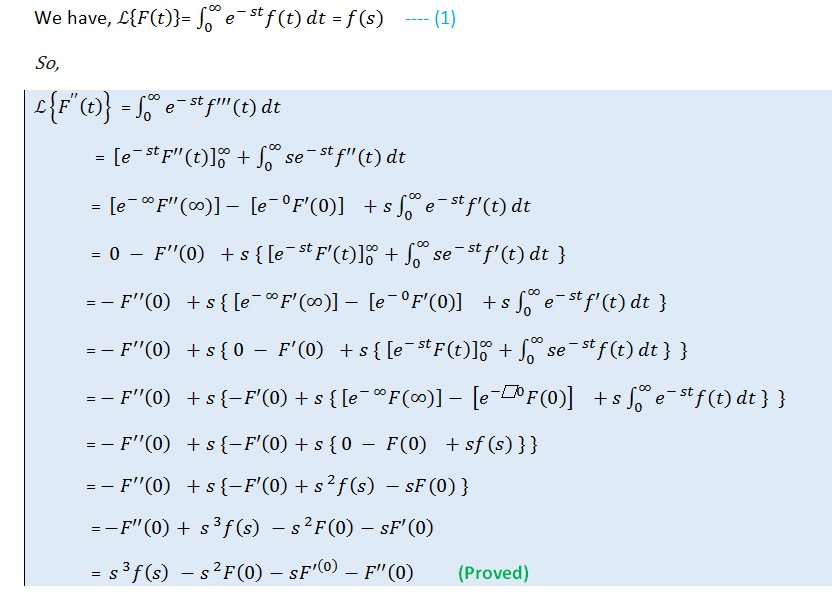
So, now we've proved all of the three basic Laplace Transform Derivatives theorem. Having any problem comment below.
Download Full Tutorial as PDF
If F(t) is a twice differential function of t then
Proof :
I've written here the complete works , we can also define that we can get one equation from previous Laplace transform theorem. So, we've proved Laplace transform second order derivatives theorem.
Laplace Transform Derivatives Third Order Proof:
We'll now find the third order derivatives theorem proof of Laplace transform here:
If F(t) is a thrice differential function of t then
If F(t) is a thrice differential function of t then
Proof Using Second Order Derivative:
Proof Third Order Full demonstration:
Now get third order derivative a more explained solution or proof
So, now we've proved all of the three basic Laplace Transform Derivatives theorem. Having any problem comment below.
Download Full Tutorial as PDF
Tags:
Laplace Transform Derivatives Theorem Proofs - First, Second, Third Order Proofs, Laplace Transform Derivatives Theorem Proofs First Order, Laplace Transform Derivatives Theorem Second Order derivatives Proof, Laplace Transform Derivatives Third Order Derivative ProofMathematics Book Differential Equation by Kedar Nath Ram Nath Download Link
Book Name : Differential Equation
Book Author : Kedar Nath Ram Nath
Book Download Link : Download From Media Fire via Adf.ly
Book Download Size - 9.5MB
Book Front Page -

So, Download Differential Equation Book By Clicking Download From Media Fire via Adf.ly Button.
Note:
If you have face any problem to download Differential Equation book of Kedar Nath Ram Nath then comment below. A direct link of this book will send to you immediately.Tags:
Mathematics Book Differential Equation by Kedar Nath Ram Nath Download Link, Kedar Nath Ram Nath Book, Differential Equation book pdf, Dr BD Sharma Book PDF Link, Kedar Nath Differential Equation Main book pdf Link
Question:
What is the difference between Open method and Bracket method?Solution:
Open method and Bracketing method has some huge difference and they are below:| Open Method | Bracketing Method |
|---|---|
| In Open Method, requires only a single starting value, no need to bracket a root | In Bracketing Method, requires two values - starting values and maximum limit. Need to bracketing a root |
| Open Methods divergence. That means, it goes from the actual root. | Bracketing Method is convergence. That means, it go to actual root. |
| Open Method sometimes not get the result. | Bracketing Method gives the result at any situation. |
| Open Method is faster that Bracketing method. | Bracketing Method is slower than Open method. |
So, we can say that their are some difference between opening method and the bracketing method. Opening method is mainly divergence and bracketing method is not and for hence others are creating.

Tags: Open method and Bracketing method, What is the difference between Open method and Bracket method?, What is the difference between Opening method and Bracketing method?, Open method vs bracket method
Subscribe to:
Posts
(
Atom
)


