
Showing posts with label Computer Programming. Show all posts
Showing posts with label Computer Programming. Show all posts
Single Server Queuing System - MatLab and C code Implementation
What:
A single server queuing system is the waiting lines or queues in that system. A single server queuing system can tell us the following things-- How many times a user need to wait in waiting & Total waiting time
- How many times user take in service time & Total service time
- How many users are in the Queue & Total queue time
- How many users has completed their work in that system yet.

Where Single server queuing system is used
Single server queuing system is applied almost all the fields in real life. Like,- In banking system, taking money from the bank. User needs to stand in a line and take money one by one
- A Bus, plane ticketing system
- Any system with line and who needs to put user in the queue

Real time example of a server queuing system - Patient Data:
 |
| Single Server Queuing Example of patient and doctor |
Single Server Queuing MatLab Code implementation without input (with figure):
Code
total=0; busy=0;
%a=randi([0 8],1,8);
 a=[.4 1.6 2.1 3.8 4.0 5.6 5.8 7.2];
a_length=length(a);
arr=zeros(a_length);

%d=randi([0 9],1,5);
d=[2.4 3.1 3.3 4.9 8.6];
b=union(a,d);
l=length(b);
a_t=0;d_t=0;q=0;
axis([0 b(length(b))+1 0 length(a)]);


%Queue delay Time
figure(1);
title('Queue Delay Time');
for i=1:l-1
   a_m=ismember(a,b(i));
   d_m=ismember(d,b(i));
   if sum(a_m)>=1
       a_t=a_t+1;
   end
   if sum(d_m)>=1
       d_t=d_t+1;
   end
   dif=a_t-d_t;
   if dif>1
       rectangle('Position',[b(i) 0 b(i+1)-b(i) dif-1],'FaceColor',[0 .5 .5]);
       arr(dif)=arr(dif)+(b(i+1)-b(i));
   end
   if dif>0
       busy=busy+(b(i+1)-b(i));
   end
end


%Server Busy Time
b_t=0;
figure(2);
title('Server Busy Time');
axis([0 b(length(b))+1 0 length(a)]);
for i=1:l-1
   a_m=ismember(a,b(i));
   d_m=ismember(d,b(i));
   if sum(a_m)>=1
       b_t=b_t+1;
   end
   if sum(d_m)>=1
       b_t=b_t-1;
   end
   if b_t>0
       rectangle('Position',[b(i) 0 b(i+1)-b(i) 1],'FaceColor',[0 .5 .5]);
   end
end
for i=1:a_length
    total=total+arr(i)*(i-1);
end
disp(total);
disp(total/d(length(d)));
disp(busy);
disp(busy/d(length(d)));
Output with Figure
(Run the code and wait. Figure will open after 2/3 seconds)
 |
| Matlab Complaete Example - Single Server Queuing system |
Single Server Queuing MatLab Code implementation with input:
N = input('Enter the Value of N: ');

% Variable Declaration
AT = [];
ST = [];
WT = [];
QL = [];
IDT = [];
CAT = [];
CDT = [];
CLK = 0;

% Initialization
AT(1) = 0;
for k = 2:N
AT(k) = input('Enter interarrival time : ');
end
for k = 1:N
ST(k) = input('Enter Service time : ');
end
CAT(1) = AT(1);
CDT(1) = ST(1);
for k = 1:N
WT(k) = 0;
IDT(k) = AT(1);
QL(k) = 0;
end

% Calculation
for i = 2:N
CAT(i) = CAT(i-1) + AT(i);
WT(i) = CDT(i-1) - CAT(i);
if WT(i) < 0
WT(i) = 0;
end

DIF = CAT(i) - CDT(i-1);
if DIF < 0
CDT(i) = CDT(i-1) + ST(i) ;
if i>2
if (CAT(i) < CDT(i-2) || QL(i-1) == 0)
QL(i) = QL(i-1) + 1;
else
QL(i) = QL(i-1);
end
else
QL(i) = QL(i-1) + 1;
end
elseif DIF > 0
CDT(i) = CAT(i) + ST(i) ;
if QL(i-1) > 0
QL(i) = QL(i-1) - 1;
end
else
QL(i) = QL(i-1);
end
if QL(i) == 0
IDT(i) = CAT(i) - CDT(i-1);
end
end

% Display Results
CAT
CDT
WT
IDT

QL
Input data / Output Example for this single server queuing system
Enter the Value of N: 8
Enter interarrival time : 10
Enter interarrival time : 15
Enter interarrival time : 35
Enter interarrival time : 30
Enter interarrival time : 10
Enter interarrival time : 5
Enter interarrival time : 5
Enter Service time : 20
Enter Service time : 15
Enter Service time : 10
Enter Service time : 5
Enter Service time : 15
Enter Service time : 15
Enter Service time : 10
Enter Service time : 10

CAT =
     0    10    25    60    90   100   105   110

CDT =
    20    35    45    65   105   120   130   140

WT =
     0    10    10     0     0     5    15    20

IDT =
     0     0     0    15    25     0     0     0

QL =

     0     1     1     0     0     1     1     2

>>
Single Server Queuing C Code implementation:
Single Server Queuing system in Java language:
import java.util.Random;

/**
*
* @author Hizbul Bahar
*/
public class SingleServer {
static int Queue_size = 32000;
static int next_event_type;
static int num_custs_delayed;
static int num_events=2;
static int num_in_q;
static int server_status;
static int num_delays_required;
static double area_num_in_q;
static double area_server_status;
static double sim_time;
static double time_last_event;
static double total_of_delays;
static double mean_interarrival;
static double mean_service;

static double[] time_arrival = new double[Queue_size];
static double[] time_next_event=new double[3];

static Random random = new Random(10000);

static void initialize()
{
sim_time = 0;

server_status = 0;
num_in_q = 0;
time_last_event = 0;

num_custs_delayed = 0;
total_of_delays = 0;
area_num_in_q = 0;
area_server_status = 0;

time_next_event[1] = sim_time + expon(mean_interarrival);
time_next_event[2] = 1.0e+30;
}

static void timing()
{

if (time_next_event[1] < time_next_event[2])
next_event_type = 1;
else
next_event_type = 2;

sim_time = time_next_event[next_event_type];
}

static void arrive()
{
double delay;

time_next_event[1] = sim_time + expon(mean_interarrival);

if (server_status == 1)
{
num_in_q++;
time_arrival[num_in_q] = sim_time;
}

else
{
delay = 0;
total_of_delays += delay;

num_custs_delayed++;
server_status = 1;

time_next_event[2] = sim_time + expon(mean_service);
}
}

static void depart()
{
if (num_in_q == 0)
{
server_status = 0;
time_next_event[2] = 1.0e+30;
}
else
{
num_in_q--;

num_custs_delayed++;
time_next_event[2] = sim_time + expon(mean_service);

for (int i = 1; i <= num_in_q; i++)
time_arrival[i] = time_arrival[i+1];
}
}

static void report()
{
System.out.println( "TOtal customer uses this server " + num_custs_delayed + "\n");
System.out.println( "Average delay in queue minutes  " + total_of_delays / num_custs_delayed + "\n");
System.out.println( "Average number in queue  " + area_num_in_q / sim_time + "\n");
System.out.println( "Server utilization  " + area_server_status / sim_time + "\n");
}

static void update_time_avg_stats()
{
double time_since_last_event;

time_since_last_event = sim_time - time_last_event;
time_last_event = sim_time;

area_num_in_q += num_in_q * time_since_last_event;

area_server_status += server_status * time_since_last_event;
}

static double expon(double  mean)
{
return -mean * Math.log(random.nextDouble());
}

public static void main(String[] args) {

timing();
update_time_avg_stats();

switch (next_event_type)
{
case 1: arrive();
break;
case 2: depart();
}
}
}
Links following to learn single server queuing system
- Wikipedia - Queuing Theory
- A single Server Queuing system.pdf
Tags:
Single Server queuing system example, Single Server Queuing System - MatLab, C, Java code Implementation, Single Server Queuing System Matlab code, Single Server Queuing System C code, Single Server Queuing System java code, Single Server Queuing System matlab code implementation, single server queue, discrete simulation example, single server code and algorithmBash Scripting at a glance - Learn Bash scripting
Take a variable and print out that in Bash Script
Output
name="Akash"
echo "Welcome $name"
Output
Welcome Akash
Take a value From input and test the input using if statement or else do others
#Simple If else in Bash

echo "Please Enter your age : "
read age

if [ $age < 10 ];
    then echo "You are really small.."
else
    echo "You are growing.."
fi
Print 1 to 100 by for loop using Bash script [Bash Programming Language]
Using seq
# Printing 1 to 100 using for loop

for((i=1;i<=100;i++))
do
    echo $i
done
Using seq
for i in `seq 1 100`
do
    echo $i
done
Print 0 to 100 even numbers and odd numbers by for loop using Bash script [Bash Programming Language]
0 to 100 even numbers using Bash Scripting
1 to 100 Odd Numbers using Bash scripting
0 to 100 even numbers using Bash Scripting
# Printing 1 to 100 even numbers using for loop
for((i=0;i<=100;i=i+2))
do
    echo $i
done
1 to 100 Odd Numbers using Bash scripting
# Printing 1 to 100 odd numbers using for loop
for((i=1;i<=100;i=i+2))
do
    echo $i
done
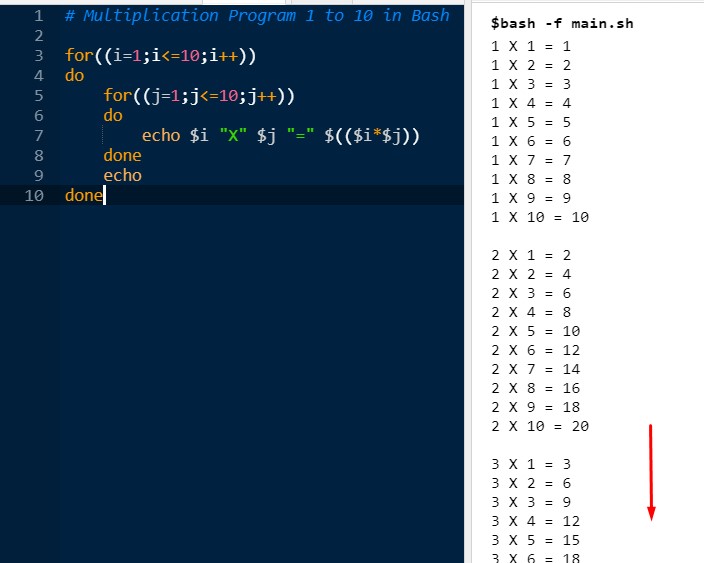
Multiplication program upto 10 using for double for loop Bash scripting [Bash Programming Language]
0 to 100 even numbers using Bash Scripting
Simple Output with Code
 Live Link - Live Demo
0 to 100 even numbers using Bash Scripting
# Multiplication Program 1 to 10 in Bash

for((i=1;i<=10;i++))
do
    for((j=1;j<=10;j++))
    do
        echo $i "X" $j "=" $(($i*$j))
    done
    echo
done
Simple Output with Code
Read a file name in Bash and check if file is exist and if file exist, then delete the file, otherwise create the file as new [Bash Programming Language]
search, create, delete a file using Bash Scripting
Explanation :
search, create, delete a file using Bash Scripting
echo "Please Enter your File Name : "
read file_name

if [ -f $file_name ];
    then  clear
    rm $file_name
    echo "File $file_name is deleted successfully"

else
    clear
    touch $file_name
    echo "No file found for your search $file_name"
fi

echo "All files are Now : "
ls
Explanation :
- Read the file_name in read file
- Check if file exist in if clause if [ -f $file_name ];
- If Exist then remove the file using rm $file_name.
- If file is not found, create a new file as that name using touch $file_name
- Finally, show the file lists, using ls.
Creating array, inserting value in the array, show the array values and delete the value by searching using Bash script [Bash Programming Language]
echo "How many numbers do you want to add in the array : "
read num

#Take value in the array and put it in a sum variable
arr=()  #Empty Array
sum=0

for ((i=0;i<num;i++));
do
    echo "Array[$i] = "
    read arr[$i]
    sum = $((sum+arr[$i]))
done

echo "Summation Is : $sum"

##
#   Delete a value from array
##

echo "Please enter a value to delete from the array = "
read delete_value;

for ((i=0;i<num;i++));
do
    if [ $((arr[$i])) = $delete_value ]; then
        unset arr[$i]   #Delete using unset
    fi
done


#Show final array
echo  "Array is = ${arr[@]}"
Reverse a Number using Bash script [Bash Programming Language]
Reverse a number using bash script in one line :
Why is this : In Bash the integer is also a text. The | reverse any string by that system.
n=123456
rev=0

while [ $n -gt 0 ]
do
    reminder=$(( $n % 10 ))
    rev=$(( rev*10 + reminder  ))
    n=$(( $n / 10 ))
done

echo $rev
Reverse a number using bash script in one line :
n=123456
echo $n | rev
Why is this : In Bash the integer is also a text. The | reverse any string by that system.
Prime Number check using Bash script [Bash Programming Language]
num=1289
i=2

while [ $i -lt $num ]
do
  if [ $(( num%i )) = 0 ];
  then
      echo "$num is not a prime number"
      echo "It is divisible by $i"
      exit
  fi
  $i=$(( i+1 ))
done

echo "$num is a prime number "
Tags:
Operating System, Computer Programming, Bash Programming, Bash Scripting at a glance - Learn Bash scripting, file read, delete, create in bash, bash for loop, bash if else, bash loop, bash even numbers, odd numbers using bash
Windows Every Short Command by Windows cmd
First go to command prompt ow windows using cmd.How to see the every command list in windows - windows command:
help
How to see the current directory in windows - windows command:
cd
How to display the directory list in that folder in windows - windows command:
dir
How to create a directory in windows - windows command:
mkdir dir_name
How to remove a directory in windows - windows command:
rmdir dir_name
How to create an empty any types file in windows - windows command:
type NUL > test.txt
type NUL > another.c
How to rename a file to new in windows - windows command:
rename test.txt demo.txt
Clear the windows screen - windows command:
cls
Rename multiple files in windows - windows command:
rename *.rtf *.txt
Tags:
Windows Every Short Command by Windows cmd, How to create an empty any types file in windows - windows command, How to remove a directory in windows - windows command, How to create a directory in windows - windows command, How to display the directory list in that folder in windows - windows command, How to see the current directory in windows - windows command
Play with C Programming loop with 20 examples code

C Program using loop - 1:
Write a program in C to display the first 10 natural numbers.
Description:Program in C language using for loop
#include <stdio.h>
void main()
{
    int i;
    printf("The first 10 natural number is: ");
    for (i=1; i<=10; i++)
    {
  printf("%d ",i);
    }
    printf("\n");
}
Output of the C program:
The first 10 natural number is: 1 2 3 4 5 6 7 8 9 10Program in C language using while loop
#include <stdio.h>
void main()
{
    int i=1;
    printf("The first 10 natural number is: ");

    while(i <= 10)
    {
        printf("%d ",i);
        i++;
    }
    printf("\n");
}
Output of the C program:
The first 10 natural number is: 1 2 3 4 5 6 7 8 9 10Program in C language using do while loop
#include <stdio.h>
void main()
{
    int a = 1;
    printf("10 Natural Number is: ")
    do
    {
        printf("%d ", a);
        a++;
    }
    while( a <= 10 );

    printf("\n");
}
Output of the C program:
The first 10 natural number is: 1 2 3 4 5 6 7 8 9 10C Program using loop - 2:
Write a program in C to display the n terms of natural numbers and their summation.
Description:Program in C language using for loop
#include <stdio.h>
void main()
{
    int i, n;
    int sum = 0;
    printf("Enter How many numbers need to sum : ");
    scanf("%d", &n);

    printf("The first %d natural numbers are : ", n);
    for (i=1; i<=n; i++)
    {
        printf("%d ",i);
        sum += i;
    }
    printf("\nThe summation is : %d\n", sum);
}
Output of the C program:
Enter How many numbers need to sum : 10
The first 10 natural numbers are : 1 2 3 4 5 6 7 8 9 10
The summation is : 55
Program in C language using while loop
#include <stdio.h>
void main()
{
    int i = 1, n;
    int sum = 0;
    printf("Enter How many numbers need to sum : ");
    scanf("%d", &n);

    printf("The first %d natural numbers are : ", n);

    while(i <= n)
    {
        printf("%d ",i);
        sum += i;
        i++;
    }
    printf("\nThe summation is : %d\n", sum);
}
Output of the C program:
Enter How many numbers need to sum : 10
The first 10 natural numbers are : 1 2 3 4 5 6 7 8 9 10
The summation is : 55
Program in C language using do while loop
#include <stdio.h>
void main()
{
    int i = 1, n;
    int sum = 0;
    printf("Enter How many numbers need to sum : ");
    scanf("%d", &n);

    printf("The first %d natural numbers are : ", n);

    do
    {
        printf("%d ",i);
        sum += i;
        i++;
    }
    while( i <= n );

    printf("\nThe summation is : %d\n", sum);
}
Output of the C program:
Enter How many numbers need to sum : 10
The first 10 natural numbers are : 1 2 3 4 5 6 7 8 9 10
The summation is : 55
After the two C codes or 6 codes using different loop you are now pretty much clear what is the same syntax in different loops in for loop, in while loop and in do-while loop.
So we'll now just use any of them and you can obviously convert them to your desired loop.
C Program using loop - 3:
Write a program in C to read 10 numbers from the keyboards and make their summation and average.
Description:Program in C language using for loop
#include <stdio.h>
void main()
{
    int i = 1, n;
    int sum = 0;
    printf("Enter How many numbers need to sum : ");
    scanf("%d", &n);

    printf("The first %d natural numbers are : ", n);

    do
    {
        printf("%d ",i);
        sum += i;
        i++;
    }
    while( i <= n );

    printf("\nThe summation is : %d\n", sum);
}
Output of the C program:
Input the 10 numbers :
Number 1 :10
Number 2 :20
Number 3 :30
Number 4 :40
Number 5 :50
Number 6 :60
Number 7 :70
Number 8 :80
Number 9 :90
Number 10 :100
The sum of 10 no is : 550
The Average is : 55.000000
C Program using loop - 4:
Write a program in C to find the multiplication table of a given integer.
Description:Program in C language using for loop
#include <stdio.h>
void main()
{
    int i,n;
    printf("Enter number of multiplication table : ");
    scanf("%d", &n);
    printf("\n");

    for(i=1; i<=10; i++)
    {
        printf("%d X %d = %d \n", n, i, n*i);
    }
}
Output of the C program:
Enter number of multiplication table : 15

15 X 1 = 15
15 X 2 = 30
15 X 3 = 45
15 X 4 = 60
15 X 5 = 75
15 X 6 = 90
15 X 7 = 105
15 X 8 = 120
15 X 9 = 135
15 X 10 = 150
C Program using loop - 5:
Write a program in C of right angle triangle of star / asterisk like that.
Description:Program in C language using for loop
#include <stdio.h>
void main()
{
    int i, j, rows;
    printf("Enter the number of rows : ");
    scanf("%d", &rows);

    for(i=1; i<=rows; i++)
    {
        for(j=1; j<=i; j++)
        {
            printf("*");
        }
        printf("\n");
    }
}
Output of the C program:
Enter the number of rows : 10
*
**
***
****
*****
******
*******
********
*********
**********
[Continuing...]
Tags:
C programming loop, c programming loop example, loops in c programming, advance level loop example in c programming, Loops, for loop in c, while loop in c, do-while loop in c, c program to print the summation of 10 numbers, c program to print triangle of star, c program to print the summation and averageDownload C programming best books free as PDF
[ If you are a people wanna learn C programming and search for a book about C programming and failed to search great books on C programming, then check this world wide books on C programming. After completing these any of the two books, you definitely will be a master in C programming ]
See In Youtube What inside these C programming Books:
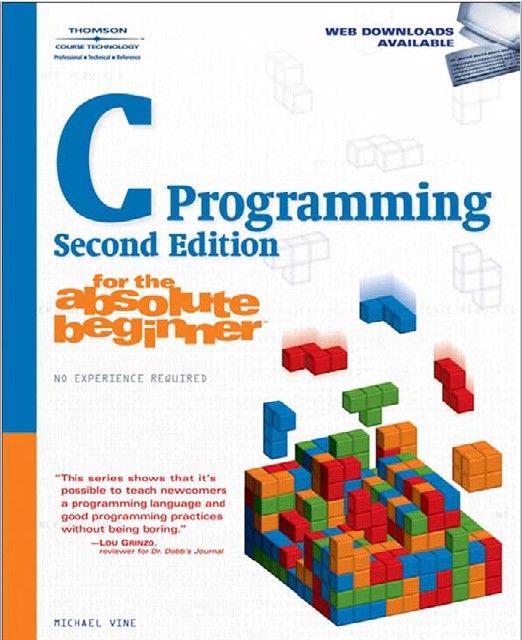
Book 1 - C Programming For Absolute Beginner :
Book Name : C programming for absolute beginner
Book Author : MICHAEL VINE
Book Category : C Programming
Book Edition : Second
Book Publisher : Thomson | Course Technology
Book Pages : 335
Book Size : 14 MB
Book Size : 14 MB
Book Level : Beginner Level C programming Book
Book Screenshot:
Download Book Free: Download "C Programming For Absolute Beginner" Book Now
Book 2 - C - The Complete Reference 4th Edition-Herbert-Schildt
Book Name : C - The Complete Reference
Book Author : Herbert Schildt
Book Category : C Programming
Book Edition : Fourth
Book Publisher : McGraw-Hill
Book Pages : 335
Book Size : 14 MB
Book Size : 14 MB
Book Level : Intermediate (Complete) Level C programming Book
Book Screenshot:

Download Book Free: Download "C - The Complete Reference" Book Now
Book 3 - C Programming Language - ANSI C - Second Edition
Book Name : C Programming Language - ANSI C
Book Author : Brian W. Kernighan & Dennis M. Ritchie
Book Category : C Programming
Book Edition : Second
Book Publisher : ANSI
Book Pages : 238
Book Size : 2.5 MB
Book Size : 2.5 MB
Book Level : Intermediate Level C programming Book
Book Screenshot:

Download Book Free: Download "C Programming Language - ANSI C" Book Now
Book 4 - Practical C Programming:
Book Name : Practical C programming
Book Author : Steve Oualline
Book Category : C Programming
Book Edition : Third
Book Publisher : O'REILLY
Book Pages : 504
Book Size : 5 MB
Book Size : 5 MB
Book Level : Intermediate Level C programming Book
Book Screenshot:

Download Book Free: Download Practical C programming Book Now [Click Skip Ad]
Book 5 - C Programming Tutorial:
Book Name : C programming Tutorial
Book Author : Mark Burgess
Book Category : C Programming
Book Edition : Fourth
Book Publisher : K&R
Book Pages : 401
Book Size : 2 MBBook Level : Intermediate Level C programming Book
Book Screenshot:

Download Book Free: Download C programming Tutorial Book Now [Click Skip Ad]
Hello World Program in C language
#include <stdio.h>
main(){
   printf("Hello World");
}
This may be the first program of almost all of the programmers in the world and it is a welcoming the world in programming. That is the Hello World program.
Demonstration:
In Line 1:
#include <stdio.h>In Line 2:
main(){..}In Line 3:
printf("Hello World");Having any problem to understand the Hello World C program, please comment below and it will be cleared, promise.
Question list Or Program in 1st
semester Suggestion
1.
What is variable? Variables rules?
2.
What is Switch case statement? Write a code of
finding GPA congratulation using switch-case statement. Like: If score is
80 or higher then give A, 70 to 79 give B …..etc.
3.
If-else statement. Give an example of if-else
statement.
Subscribe to:
Posts
(
Atom
)


