
Showing posts with label Operating System. Show all posts
Showing posts with label Operating System. Show all posts
Bash Scripting at a glance - Learn Bash scripting
Take a variable and print out that in Bash Script
Output
name="Akash"
echo "Welcome $name"
Output
Welcome Akash
Take a value From input and test the input using if statement or else do others
#Simple If else in Bash

echo "Please Enter your age : "
read age

if [ $age < 10 ];
    then echo "You are really small.."
else
    echo "You are growing.."
fi
Print 1 to 100 by for loop using Bash script [Bash Programming Language]
Using seq
# Printing 1 to 100 using for loop

for((i=1;i<=100;i++))
do
    echo $i
done
Using seq
for i in `seq 1 100`
do
    echo $i
done
Print 0 to 100 even numbers and odd numbers by for loop using Bash script [Bash Programming Language]
0 to 100 even numbers using Bash Scripting
1 to 100 Odd Numbers using Bash scripting
0 to 100 even numbers using Bash Scripting
# Printing 1 to 100 even numbers using for loop
for((i=0;i<=100;i=i+2))
do
    echo $i
done
1 to 100 Odd Numbers using Bash scripting
# Printing 1 to 100 odd numbers using for loop
for((i=1;i<=100;i=i+2))
do
    echo $i
done
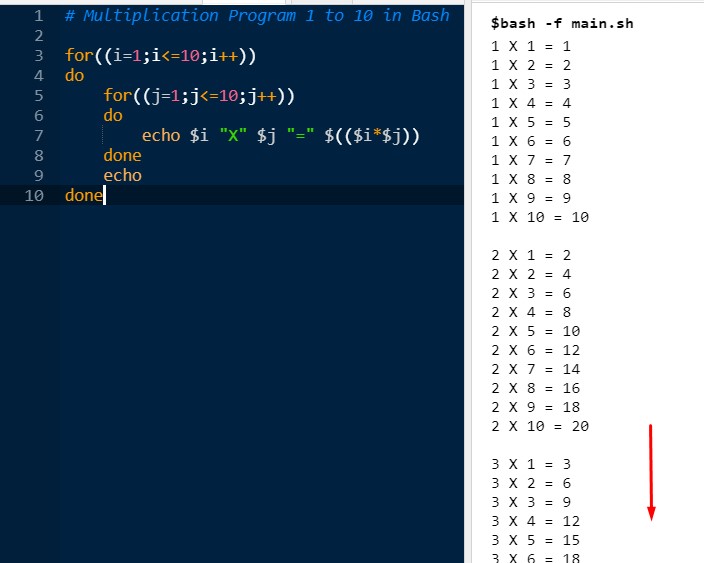
Multiplication program upto 10 using for double for loop Bash scripting [Bash Programming Language]
0 to 100 even numbers using Bash Scripting
Simple Output with Code
 Live Link - Live Demo
0 to 100 even numbers using Bash Scripting
# Multiplication Program 1 to 10 in Bash

for((i=1;i<=10;i++))
do
    for((j=1;j<=10;j++))
    do
        echo $i "X" $j "=" $(($i*$j))
    done
    echo
done
Simple Output with Code
Read a file name in Bash and check if file is exist and if file exist, then delete the file, otherwise create the file as new [Bash Programming Language]
search, create, delete a file using Bash Scripting
Explanation :
search, create, delete a file using Bash Scripting
echo "Please Enter your File Name : "
read file_name

if [ -f $file_name ];
    then  clear
    rm $file_name
    echo "File $file_name is deleted successfully"

else
    clear
    touch $file_name
    echo "No file found for your search $file_name"
fi

echo "All files are Now : "
ls
Explanation :
- Read the file_name in read file
- Check if file exist in if clause if [ -f $file_name ];
- If Exist then remove the file using rm $file_name.
- If file is not found, create a new file as that name using touch $file_name
- Finally, show the file lists, using ls.
Creating array, inserting value in the array, show the array values and delete the value by searching using Bash script [Bash Programming Language]
echo "How many numbers do you want to add in the array : "
read num

#Take value in the array and put it in a sum variable
arr=()  #Empty Array
sum=0

for ((i=0;i<num;i++));
do
    echo "Array[$i] = "
    read arr[$i]
    sum = $((sum+arr[$i]))
done

echo "Summation Is : $sum"

##
#   Delete a value from array
##

echo "Please enter a value to delete from the array = "
read delete_value;

for ((i=0;i<num;i++));
do
    if [ $((arr[$i])) = $delete_value ]; then
        unset arr[$i]   #Delete using unset
    fi
done


#Show final array
echo  "Array is = ${arr[@]}"
Reverse a Number using Bash script [Bash Programming Language]
Reverse a number using bash script in one line :
Why is this : In Bash the integer is also a text. The | reverse any string by that system.
n=123456
rev=0

while [ $n -gt 0 ]
do
    reminder=$(( $n % 10 ))
    rev=$(( rev*10 + reminder  ))
    n=$(( $n / 10 ))
done

echo $rev
Reverse a number using bash script in one line :
n=123456
echo $n | rev
Why is this : In Bash the integer is also a text. The | reverse any string by that system.
Prime Number check using Bash script [Bash Programming Language]
num=1289
i=2

while [ $i -lt $num ]
do
  if [ $(( num%i )) = 0 ];
  then
      echo "$num is not a prime number"
      echo "It is divisible by $i"
      exit
  fi
  $i=$(( i+1 ))
done

echo "$num is a prime number "
Tags:
Operating System, Computer Programming, Bash Programming, Bash Scripting at a glance - Learn Bash scripting, file read, delete, create in bash, bash for loop, bash if else, bash loop, bash even numbers, odd numbers using bash
Tutorial on:
FCFS - First Come First Serve Code and Algorithm in C.FCFS - First Come First Serve
First Come First Serve or FCFS is based on First Come First Serve Basis.Algorithm of FCFS:
- Which process comes first to CPU, the process will serve then.
- It is mainly a non preemptive scheduling algorithm. That means, no stop of a process when that's running.
- FCFS implements the First In First Out (FIFO) algorithm. That means which come first to the queue, that will out first from the queue.
C Code of FCFS / First Come First Serve C implementation:
#include<stdio.h>

int main()
{
    int n, burst_time[100], waiting_time[100], turn_around_time[100];
    int average_wating_time=0,average_turn_around_time=0;

    printf("Total Processes : ");
    scanf("%d",&n);

    int i, j;
    printf("\nEnter Burst Time : \n");
    for(i=0; i<n; i++)
    {
        printf("P%d = ",i+1);
        scanf("%d",&burst_time[i]);
    }

    waiting_time[0]=0;
    for(i=1; i<n; i++)
    {
        waiting_time[i]=0;
        for(j=0; j<i; j++){
            waiting_time[i] = waiting_time[i] + burst_time[j];
        }

    }


    printf("\n--------------------------------------------------------------");
    printf("\nProcess\t\tBurst Time\tWaiting Time\tTurn around Time");
    printf("\n--------------------------------------------------------------\n");

    for(i=0; i<n; i++)
    {
        turn_around_time[i] = burst_time[i] + waiting_time[i];
        average_wating_time += waiting_time[i];
        average_turn_around_time += turn_around_time[i];
        printf("\nProcess = %d\t\t%d\t\t%d\t\t%d", i+1, burst_time[i], waiting_time[i], turn_around_time[i]);
    }

    average_wating_time = average_wating_time/n;
    average_turn_around_time = average_turn_around_time / n;


    printf("\n\nAverage Waiting Time:%d", average_wating_time);
    printf("\nAverage Turnaround Time:%d\n\n", average_turn_around_time);

    return 0;
}
Output of FCFS:

Explanation of First Come First Serve Algorithm (FCFS)
1) First take the burst time for processes in an array called burst_time[], in these lines, for(i=0; i<n; i++)
{
printf("P%d = ",i+1);
scanf("%d",&burst_time[i]);
}2) Then check waiting time. For our first process which waiting time = 0 and for what.
waiting_time[0]=0;3) Then in the waiting_time[] put the waiting times using waiting_time = waiting_time + burst_time for that process. In these lines,
    for(i=1; i<n; i++)
    {
        waiting_time[i]=0;
        for(j=0; j<i; j++){
            waiting_time[i] = waiting_time[i] + burst_time[j];
        }

    }
4) Then Find the turn around time, average waiting time in these lines,
    for(i=0; i<n; i++)
    {
        turn_around_time[i] = burst_time[i] + waiting_time[i];
        average_wating_time += waiting_time[i];
        average_turn_around_time += turn_around_time[i];
        printf("\nProcess = %d\t\t%d\t\t%d\t\t%d", i+1, burst_time[i], waiting_time[i], turn_around_time[i]);
    }
5) Find Average waiting time and average turn around time by dividing the n, in these lines-
    average_wating_time = average_wating_time/n;
    average_turn_around_time = average_turn_around_time / n;
Advantages of FCFS or First Come First Serve Algorithm:
- FCFS is suitable for batch system, basically.
- FCFS is easier to implement.
Disadvantages of FCFS or First Come First Serve Algorithm:
- Waiting time can be large if short request wait for the long process in execution.
- FCFS is not suitable for time sharing system where it is important that each user should get the CPU for equal amount of time interval.
Note:Having any problems in this First Come First Serve algorithm or code, please comment here and don't hesitate.
Tags:
FCFS - First Come First Serve Code in C, Algorithm, Advantage, Disadvantage, FCFS Algorithm, FCFS code in C, FCFS code, FCFS algorithm.
Question:
What is Round Robin Scheduling in Operating System?Solution:
The round-robin (RR) scheduling algorithm is designed especially for timesharing systems. It is similar to FCFS scheduling, but preemption is added to enable the system to switch between processes. A small unit of time, called a time quantum or time slice, is defined. A time quantum is generally fronc 10 to 100 milliseconds in length. The ready queue is treated as a circular queue.
The CPU scheduler goes around the ready queue, allocating the CPU to each process for a time interval of up to 1 time quantum.
The average waiting time under the RR policy is often long. Consider the following set of processes that arrive at time 0, with the length of the CPU burst given in milliseconds:
Process Burst Time
P1 24
P2 3
P3 3
If we use a time quantum of 4 milliseconds, then process P1 gets the first 4 milliseconds. Since it requires another 20 milliseconds, it is preempted after the first time quantum, and the CPU is given to the next process in the queue, process P2 . Process P2 does not need 4 milliseconds, so it quits before its time quantum expires. The CPU is then given to the next process, process P3. Once each process has received 1 time quantum, the CPU is returned to process P1 for an additional time quantum.

The resulting RR schedule is as follows:

Let's calculate the average waiting time for the above schedule. P1 waits for 6 milliseconds (10- 4), P2 waits for 4 milliseconds, and P3 waits for 7 milliseconds.
Thus, the average waiting time is 17/3 = 5.66 milliseconds.
Thus, the average waiting time is 17/3 = 5.66 milliseconds.
Tags:
What is Round Robin Scheduling in Operating System? - Solution, What is Round Robin Scheduling in Operating System, Round Robin scheduling CPU, Round Robin scheduling, average waiting time in Round Robin Scheduling
What is Round Robin Scheduling in Operating System? - Solution, What is Round Robin Scheduling in Operating System, Round Robin scheduling CPU, Round Robin scheduling, average waiting time in Round Robin Scheduling
Question:
What are the three main purposes of an operating system?
Solution:
There are three main purposes of an Operating system. The three main purposes are:

Read More
What are the three main purposes of an operating system?
Solution:
There are three main purposes of an Operating system. The three main purposes are:
- To provide an environment for a computer user to execute programs on computer hardware in a convenient and efficient manner.
- To allocate the separate resources of the computer as needed to solve the problem given. The allocation process should be as fair and efficient as possible.
- As a control program it serves two major functions: (1) supervision of the execution of user programs to prevent errors and improper use of the computer, and (2) management of the operation and control of I/O devices.

Tags:
What are the three main purposes of an operating system, What are the three main purposes of an operating system solution, operating system solution, operating system question answer
What is an OS-Operating System
Question: What is an OS
Solution: What is an OS
An operating system is a program that acts as an intermediary between the user of a computer and the computer hardware. The purpose of an operating system is to provide an environment in which a user can execute programs in a convenient and efficient manner.
An operating system is software that manages the computer hardware. The hardware must provide appropriate mechanisms to ensure the correct operation of the computer system and to prevent user programs from interfering with the proper operation of the system.

Tags: What is an OS, Answer of What is an OS, Operating system question and solution
Operating System and concept books main basic question for exam:
Chapter-1:
1 .What is OS?2. What are the basic components of OS?
3. What are the role of an OS?
4. Describe the following terms-
a)Batch b)Time sharing c)Multiprogramming d)Interactive system e)Embedded system
5. What is the difference between ‘User’ and ‘Kernel’ mode operation?
6. What is the difference between ‘process’ and ‘thread’?
7. How OS manages resources?
8. "An operating system is similar to a government" - Justify

Chapter-2:
8. Describe OS services?Or, Explain importance of OS from ‘user’ & ’system’ perspective.
9. Classify and explain OS according to user interface?
10. What is system call?
11. Define the name of different type of system call?
12. What is the difference between a ‘process’ and ‘program’?
13. Describe OS design and implementation.
14. What is virtual machine in OS? Why it is necessary?
15. What are the functions of System Program?
16. What is system Boot?
Chapter-3:
17. What is process? Describe process state with illustration?18. What is process scheduling? Why we need it?
19. Describe difference between long and short term scheduling?
20. What is context switching? Why it is necessary?
21. What is process cooperation? ‘Producer-Consumer’ is paradigm for cooperating process
explain?
22. How program related with process? Describe process management?
23. Describe Massage passing in OS?
Chapter-4:
24. What is thread? Why Multithreading is necessary?25. What is the benefit of multicore system?
26. How Concurrent Execution on a multi-core system is preferred than single core-system?
27. Describe different types of multithread models?
30. What is the difference between Java and Linux thread?
31. Describe Asynchronous and Deferred cancellation?
Chapter-5:
32. What is burst time?33. What is CPU Scheduler? Describe scheduling criteria?
34. Describe the following scheduling algorithm-
a) FCFS b)S JF c) Priority d) Round Robin
35. Describe Multilevel Queue Scheduling and Multilevel Feedback Queue with example?
36. Describe Multicore processor scheduling?
Chapter-6:
37. What is Race Condition explain?38. What is critical section? How to solute this problem?
39. What is a semaphore? How to implement a semaphore in java?
40. How deadlock occurs in OS? How to prevent it?
41. Write short description on-
a)B-Buffer problem b) R and W Problem c) Dining-Philosophers Problem
42. What is monitor? How it works in Java?
Chapter-7:
43. What are the characteristics of deadlock?44. What are the technique of deadlock avoidance?
Subscribe to:
Comments
(
Atom
)


